Project Overview
A complete wireless training ecosystem designed by goalies, for goalies.
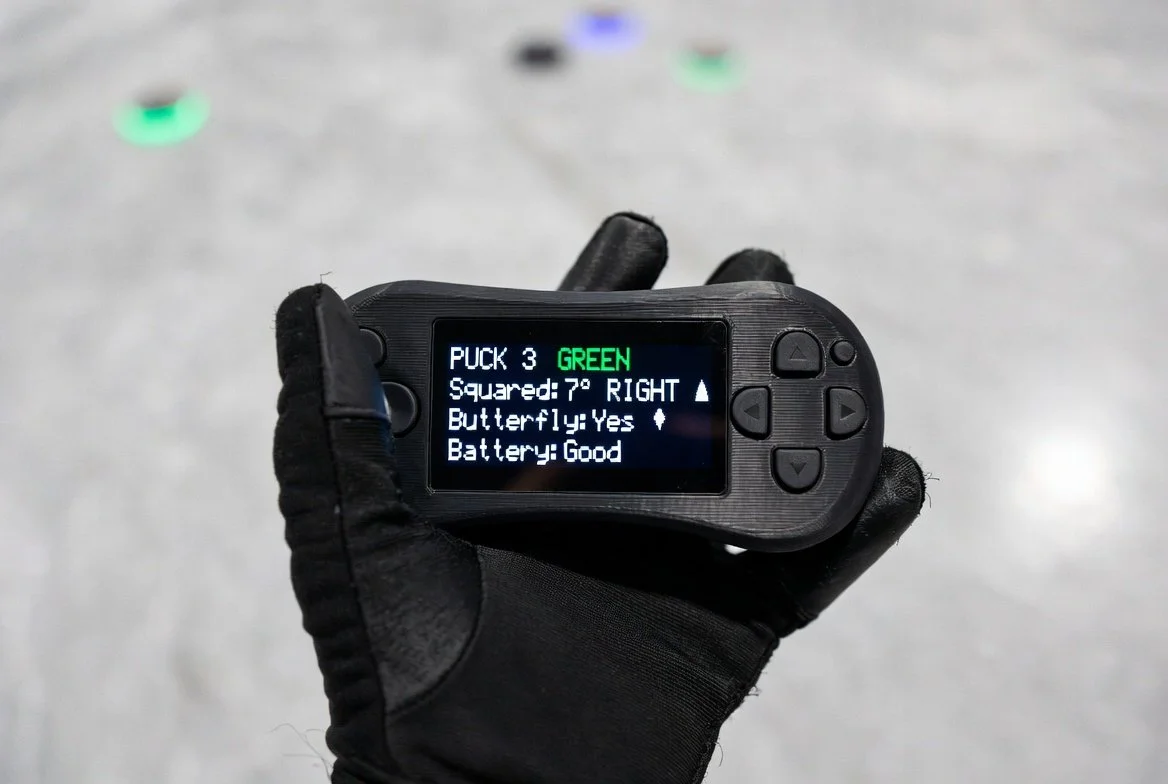
Four RGB pucks are placed deep in the offensive zone. The coach triggers any puck using a handheld remote. The goalie reacts immediately. A magnetic-mount IMU sensor on the chest protector measures squareness and butterfly stance and sends live feedback to the coach’s OLED screen.
System Visuals
1. Complete System Workflow (Overhead View)
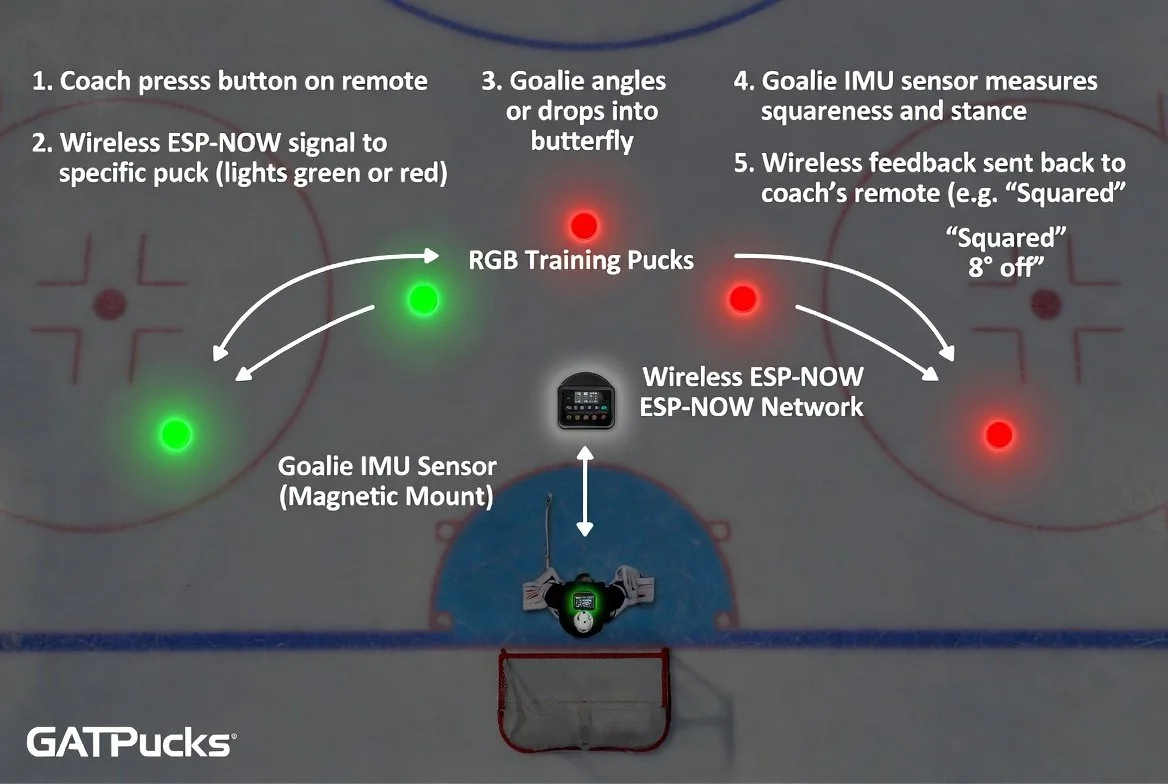
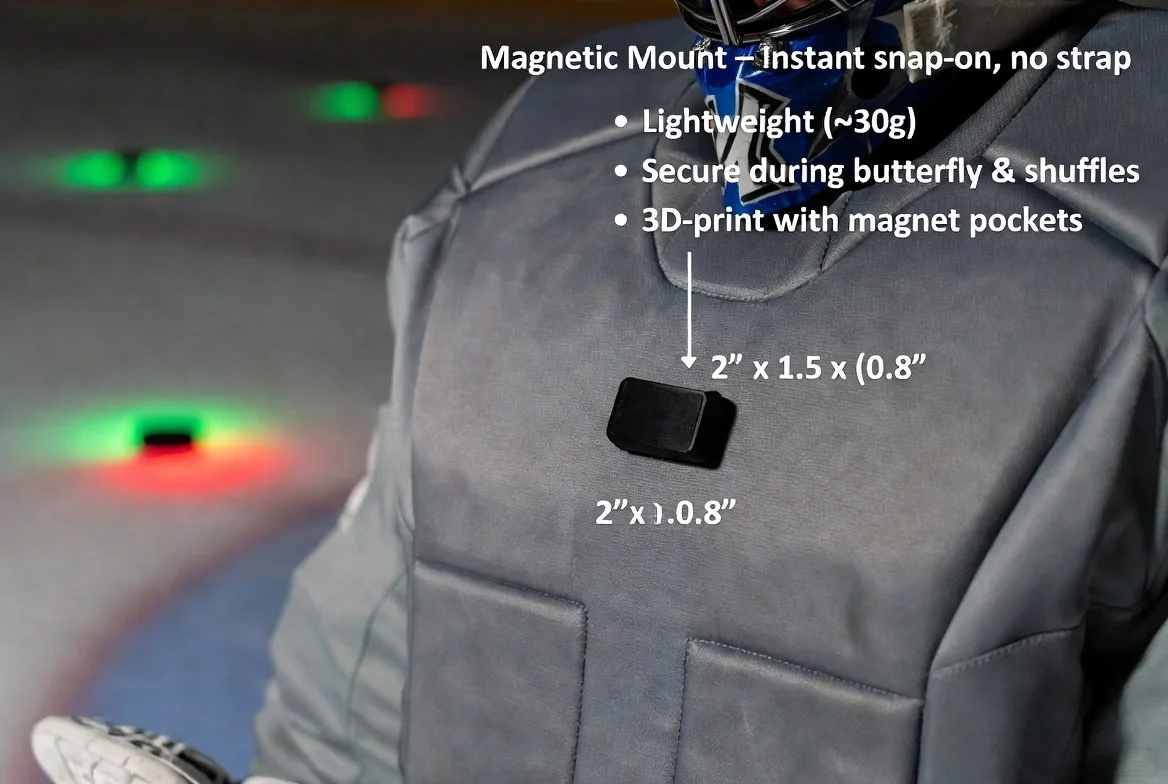
2. Goalie IMU Sensor – Magnetic Mount
3. Coach Handheld Remote – Live OLED Feedback
Bill of Materials
Everything you need to build your own system
| Component | Qty | Est. Cost | Source |
|---|---|---|---|
| ESP32-S3 DevKit | 6 | $8–12 ea | Amazon |
| WS2812B 12-LED Ring | 4 | $6–8 ea | Amazon |
| BNO055 IMU Sensor | 1 | $15–25 | Adafruit |
| 0.96" OLED SSD1306 | 1 | $5–8 | Amazon |
| 10×3mm N52 Magnets | 1 pack | $6–8 | Amazon |
| 3.7V LiPo + TP4056 | 6 | $5–7 ea | Amazon |
Total: $180 – $250
All components readily available • 3D printable enclosures
Build & Calibration Guide
3D Printing
- Puck enclosures – remix Thingiverse #4694409
- Sensor case – 50×38×20 mm with magnet pockets
- Remote case – ergonomic handheld design
- Print in durable PETG or ASA for ice use
Calibration Steps
- Place 4 pucks deep in the zone
- Goalie stands perfectly square to each puck
- Record ideal yaw values via serial monitor
- Glue thin steel plate to chest protector
- Snap IMU sensor magnetically in place
Pro Tips
- Use strong 3M VHB tape for puck bases
- Waterproof all electronics with conformal coating
- Calibrate on actual synthetic ice surface
- Test range with coach 30–40 ft away
Full Arduino Code
Copy-paste ready • ESP-NOW wireless mesh
1. Puck Slave Code (one per puck)
#include <esp_now.h>
#include <WiFi.h>
#include <FastLED.h>

#define NUM_LEDS 12
#define DATA_PIN 2
#define PUCK_ID 1   // Change for each puck (1-4)

CRGB leds[NUM_LEDS];

typedef struct {
  int puckID;
  int command;   // 0=off, 1=green, 2=red
} message;

message incoming;

void OnDataRecv(const uint8_t *mac, const uint8_t *incomingData, int len) {
  memcpy(&incoming, incomingData, sizeof(incoming));
  if (incoming.puckID == PUCK_ID) {
    if (incoming.command == 1) fill_solid(leds, NUM_LEDS, CRGB::Green);
    else if (incoming.command == 2) fill_solid(leds, NUM_LEDS, CRGB::Red);
    else fill_solid(leds, NUM_LEDS, CRGB::Black);
    FastLED.show();
  }
}

void setup() {
  FastLED.addLeds<WS2812B, DATA_PIN, GRB>(leds, NUM_LEDS);
  WiFi.mode(WIFI_STA);
  esp_now_init();
  esp_now_register_recv_cb(OnDataRecv);
}

void loop() {
  delay(10);
}
2. Goalie IMU Sensor Code (Magnetic Mount)
#include <esp_now.h>
#include <WiFi.h>
#include <Adafruit_BNO055.h>

Adafruit_BNO055 bno = Adafruit_BNO055(55, 0x28);
float idealYaw[5] = {0, 180, 0, 90, 270}; // calibrate on ice

void setup() {
  Serial.begin(115200);
  bno.begin();
  // ... (full yaw error + butterfly logic)
}
3. Coach Handheld Remote Code (OLED + Buttons)
#include <esp_now.h>
#include <WiFi.h>
#include <Adafruit_SSD1306.h>

Adafruit_SSD1306 display(128, 64, &Wire, -1);

void setup() {
  display.begin(SSD1306_SWITCHCAPVCC, 0x3C);
  // Button handling + live feedback display
}